

想要在easydatagrid列表里面显示图片,并实现点击预览功能,可以使用以下方法进行实现:
下面我以图片字段格式为:upload/file/aa.png,upload/file,bb.png来简单说明
//这个是datagrid列表显示的那一行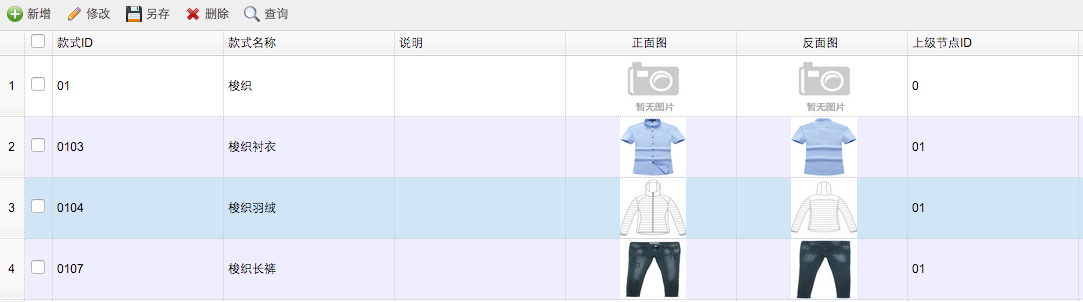 最后是预览
最后是预览
下面我以图片字段格式为:upload/file/aa.png,upload/file,bb.png来简单说明
//这个是datagrid列表显示的那一行
<th data-options="field:'images',width:300,align:'center',formatter:imgFormatter">图片预览</th>
//显示图片的js
//图片添加路径
function imgFormatter(value,row,index){
     if('' != value && null != value){
    var strs = new Array(); //定义一数组
    if(value.substr(value.length-1,1)==","){
        value=value.substr(0,value.length-1)
    }
        strs = value.split(","); //字符分割
  var rvalue ="";
    for (i=0;i<strs.length ;i++ ){
        rvalue += "<img onclick=download(\""+strs[i]+"\") style='width:66px; height:60px;margin-left:3px;' src='<%=path%>" + strs[i] + "' title='点击查看图片'/>";
        }
    return  rvalue;
     }
    }
最后是预览
//这里需要自己定义一个div   来创建一个easyui的弹窗展示图片
    function download(img){
        var simg =  "http://img02.ygqq.com/"+ img;
        $('#dlg').dialog({
            title: '预览',
            width: 600,
            height:750,
            resizable:true,
            closed: false,
            cache: false,
            modal: true
        });
        $("#simg").attr("src",simg);

    }
我要分享文章
最近发布 »
- windows IIS6服务器全站301永久重定向设置方法
- thinkPHP实现签到功能的方法
- 详解java代码中init method和destroy method的三种使用方式
- Python获取文件所在目录和文件名的方法
- linux sudo命令详解
- 用于判断用户注册时,密码强度的JS代码
- Django-Rest-Framework 权限管理源码浅析(小结)
- 服务器 安全检查要点[星外提供]
- python 导入数据及作图的实现
- JS正则替换去空格的方法
- 微信小程序promsie.all和promise顺序执行
- Android实现渐变色的圆弧虚线效果
- Python中文编码那些事
- JS跨域请求外部服务器的资源
- asp的程序能实现伪静态化的方法
- 基于Vue.js与WordPress Rest API构建单页应用详解
- 修改MaxFieldLength与MaxRequestBytes彻底解决Request Too Long的问题
- sql字符串函数大全和使用方法示例